Chrome extension for Twitch

Twitch chat,
reimagined

We’ve combined everything you actually use like 7TV emotes, social link previews, and audio leveling into one seamless, responsive interface.

replaces 7TV BTTV FFZ
peepoShy
Jigglin
peepoTalk
POGGERS
oooo
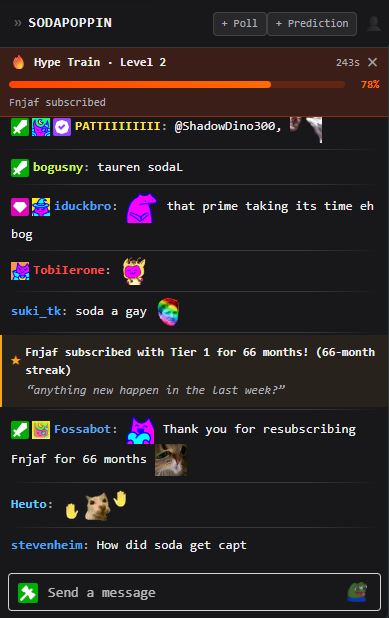
TwiChat extension — chat panel
What’s inside

Everything you need.
Nothing you don’t

Get a clean, lightning-fast interface that’s dead simple to use.

Every third-party emote, in one panel

7TV, BetterTTV and FrankerFaceZ load natively — animated emotes included. No more grey boxes where the good ones should be.

PepeLaugh PepeLaugh 7TV OMEGALUL OMEGALUL 7TV catJAM catJAM BTTV peepoLove peepoLove FFZ EZ EZ BTTV monkaW monkaW FFZ

Stupidly fast

A custom-rendered panel that stays smooth through raids and emote spam.

Rendering Latency2.1ms
Memory Usage−61%
Performance> 9000

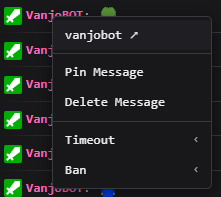
Effortless Moderation

Manage your chat instantly with a simple right-click.

TwiChat moderation screenshot

Audio tools built in

Tired of streamers jumping from ear-piercing screams to barely audible whispers? Our audio compressor smooths out the highs and lows, so you can just sit back and enjoy the show.

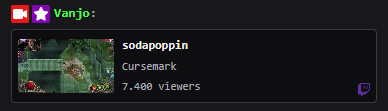
Inline link previews

Clips, images and pages unfurl right in the chat — Twitch, YouTube, Instagram, TikTok. NSFW guards baked in.

Link preview example
A drop-in replacement

Same spot.
Better chat.

TwiChat takes over the native sidebar — nothing to rearrange, nothing to learn. Install it and the panel you already use just gets an upgrade.

  • 01

    Lands where chat already lives

    Replaces the default panel in place — your layout stays exactly as it was.

  • 02

    Colored names, badges & replies

    Full message threading, sub/VIP/mod badges, and readable username colors.

  • 03

    Private by design

    No accounts, no analytics, no telemetry. Everything runs locally in your browser.

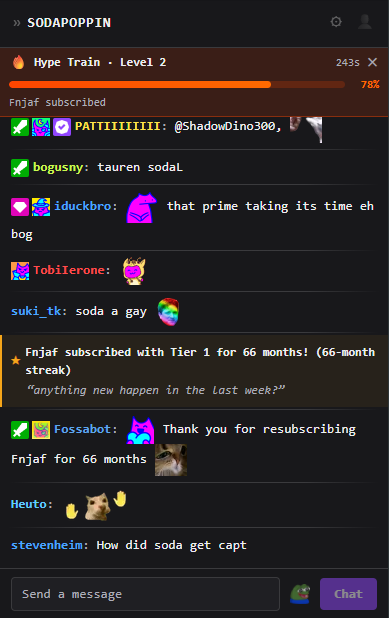
TwiChat extension — in Twitch sidebar
3
Emote providers, unified
>9000
Performance through emote spam
2clicks
Ban, timeout or delete
0
Trackers, ever
where / how / what

Frequently Asked Questions

How do I install TwiChat?
  1. Open the TwiChat page on the Chrome Web Store
  2. Click Add to Chrome
  3. Confirm with Add extension in the popup
  4. Open Twitch and TwiChat is ready to go
How do I update the extension?
  1. Chrome updates it automatically from the Web Store.
  2. To force an update, go to Extensions → Manage Extensions, enable Developer mode, then click Update (top-left corner).
  3. If an update adds new permissions, Chrome will show "Action required".
  4. Accept the permissions and you're good to go.
How do I set a default emote tab?
Right-click on the tab you want to use as your default, and it will be selected automatically.
How do I add emotes to my favorites?
Right-click on an emote in the menu - right-click again to remove it.
How do I setup a @mention sound?
Open Settings (cog icon top right), click Upload, select your file. You can then adjust the alert volume to your preference.
How do I enable / disable the audio compressor?
Open Settings (cog icon top right), find audio compressor section, use the toggle.